
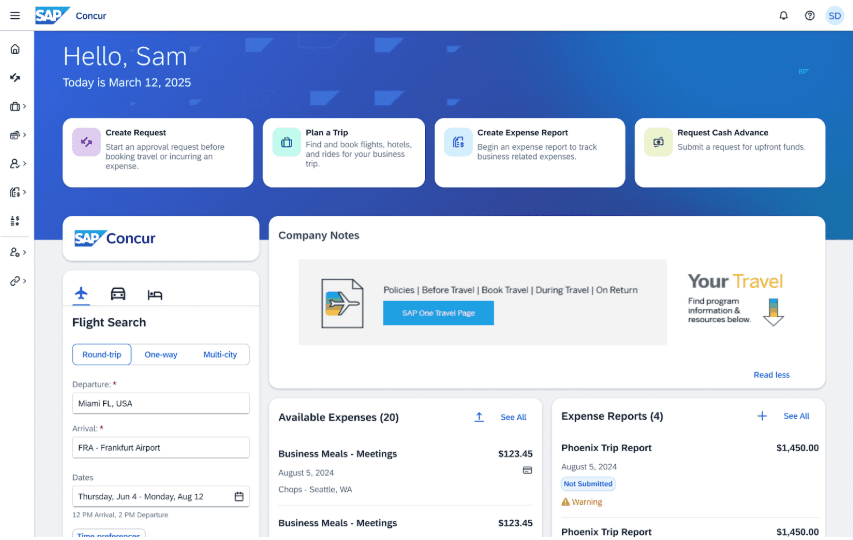
Concur Homepage Call to Action tiles – coming January 2026
- A new banner will be introduced at the top of the Concur homepage, providing users with easy access to some actions.
- Initial Call to Action Tiles: The banner will feature tiles for easy access to common tasks:
- Create Request
- Plan a Trip
- Create Expense Report
- Request Cash Advance
This enhancement is designed to save time and make initiating common tasks more intuitive.
Prepaid Expense Crossing FY Field: Target Date January 12, 2026
The “Prepaid Expense Crossing FY” field will be added to the Expense Report. This field will be hidden from the traveler/Delegate during creating and submitting the Expense Report for approval. This field is for Approvers (Cost Object Approver, Supervisor Approver, or a user-added Approver) to designate expenses that have been prepaid (paid before July 1 of the coming fiscal year for trips occurring after June 30 in the coming fiscal year) and need to be tracked and reportable for fiscal year accounting purposes.
Explanation of Not Using a Preferred Agency Field: Target Date January 12, 2026
The “Explanation of Not Using a Preferred Agency” field will be removed from the Travel Request. Previously, this field documented the justification on the Travel Request for not using a preferred car rental agency (Hertz or Enterprise). Moving forward, the required justification for not selecting a preferred car rental agency will need to be submitted in a comment on the Expense Report for the car rental line item to include attaching any supporting documentation.